Email APIReceipts from templates you edit

Know who is still waiting for a reply.

SagePigeon takes the forms you already have, sends each request to the right person and times it until somebody answers. Your receipts go out from the same place, from email templates you change without a deploy.

  • Kept before anything is sent
  • Sent to the right person
  • Timed until somebody answers

Free for 500 submissions a month. No card.

  • Forms
  • Inbox and reply clock
  • Email templates and API
  • Clients and agencies
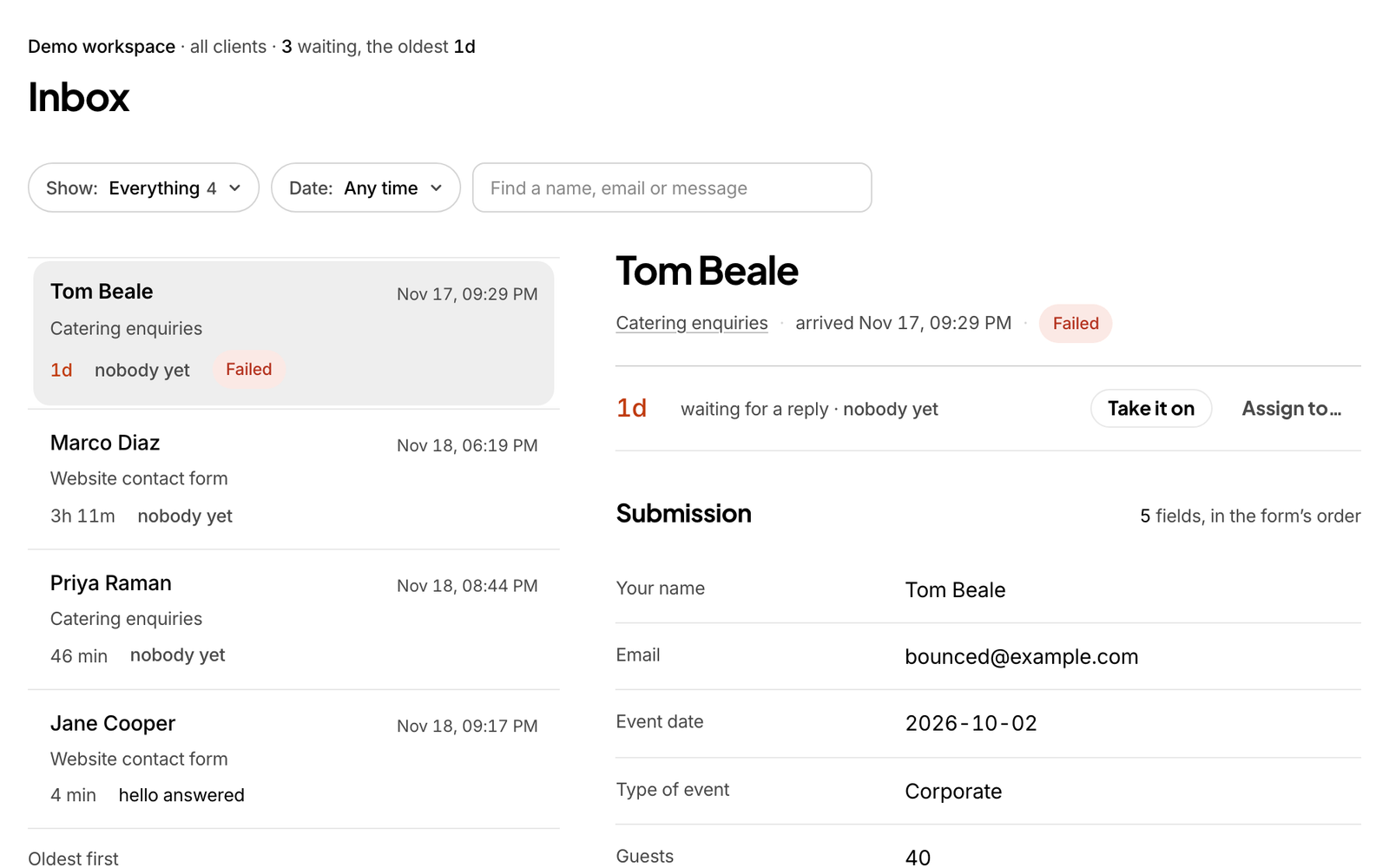
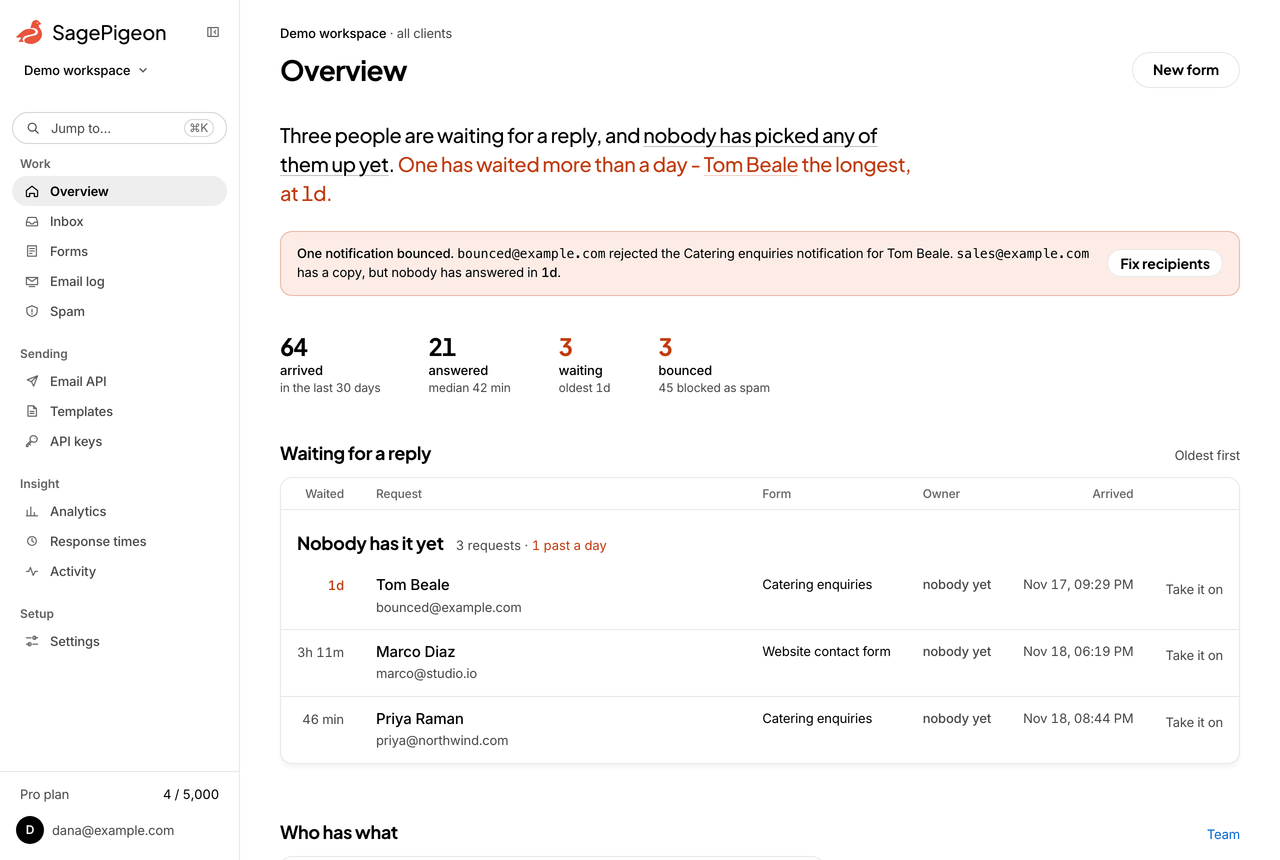
The SagePigeon overview page for an agency workspace. A sentence at the top says five people are waiting for a reply and nobody has picked any of them up yet, two have waited more than a day, the longest for 1d 16h. Below it, four figures for the last thirty days and a ledger of the requests waiting, each with how long it has waited.

From their click to your reply

What happens to one request, in the order it happens.

One request, from the click to the reply, with the clock sped up. Routing rules and reply threading come with Pro and Scale.
  1. Priya fills in the form on your website and presses Send.
  2. SagePigeon writes the request to your workspace before it sends anything.
  3. A routing rule picks the person it belongs to: here, sales.
  4. The notification goes to sales with a reply address on it, and the clock starts.
  5. Dana answers from her own inbox. The reply threads back onto the request and the clock stops.
  6. The reply is passed on to Priya, and the request shows how long she waited.
  • Kept before anything is sent

    Each submission is written to your workspace first, so a bounced notification never loses a request.

  • Sent to the right person

    On Pro and Scale, rules you write in the dashboard send a sales lead to sales, a support question to support and a large budget to whoever owns it. On Free, every request goes to the form’s recipients.

  • Timed until somebody answers

    On Pro and Scale, reply from Gmail or Outlook and the answer threads back onto the request and stops its clock. A request left a day gets you an email on every plan.

A delivered email is not an answered request

The form worked and the email arrived. Whether anyone replied is still unknown.

Requests in a shared inbox

  • Every notification looks the same
  • Nobody knows who has picked one up
  • Saturday’s request is on page two by Monday

Requests in SagePigeon

  • Who is waiting, longest first
  • Who has each one, by name

The forms people send you, and the mail you send them

Real pages from a workspace with three clients.

Keep your form. Change where it sends.

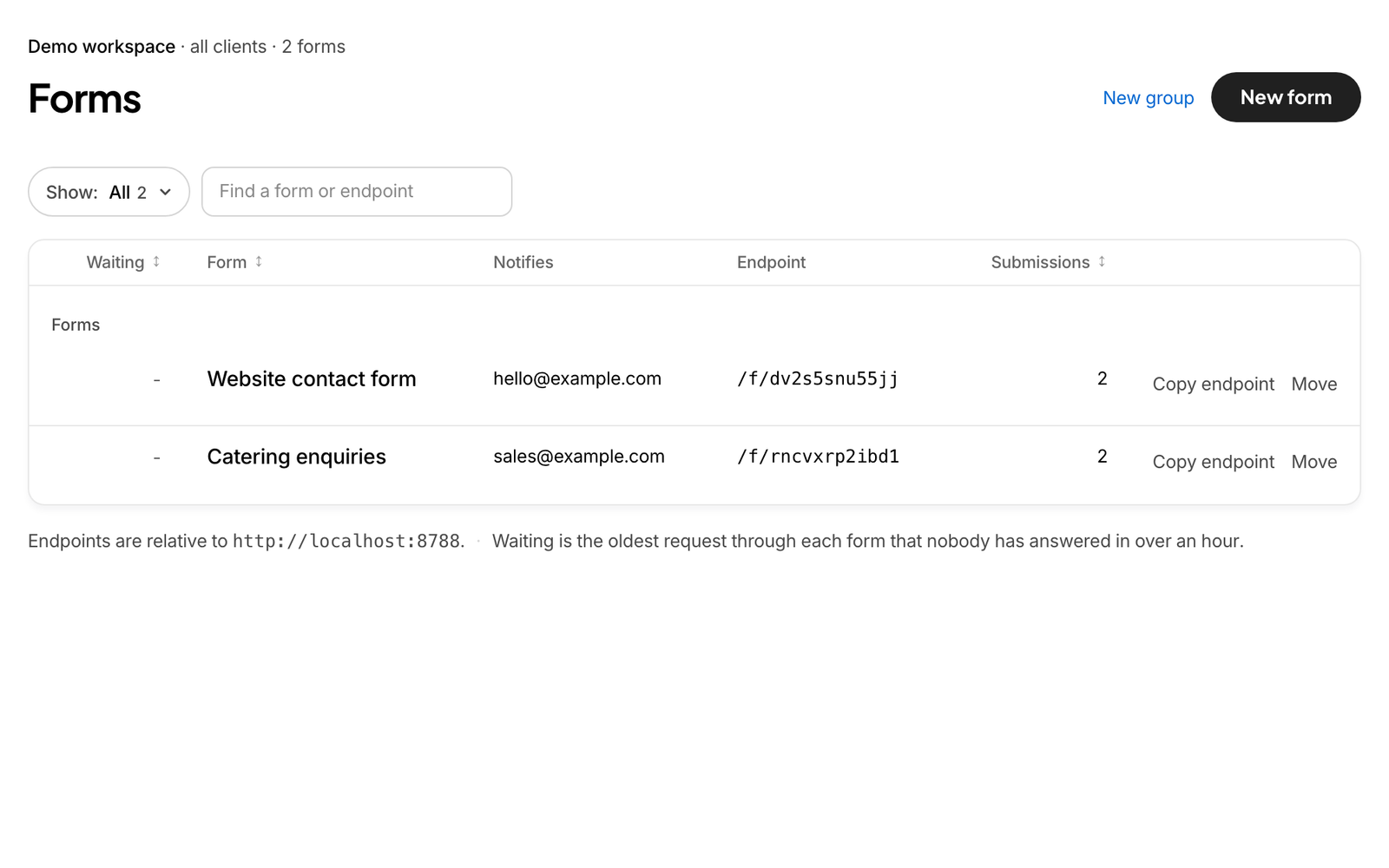
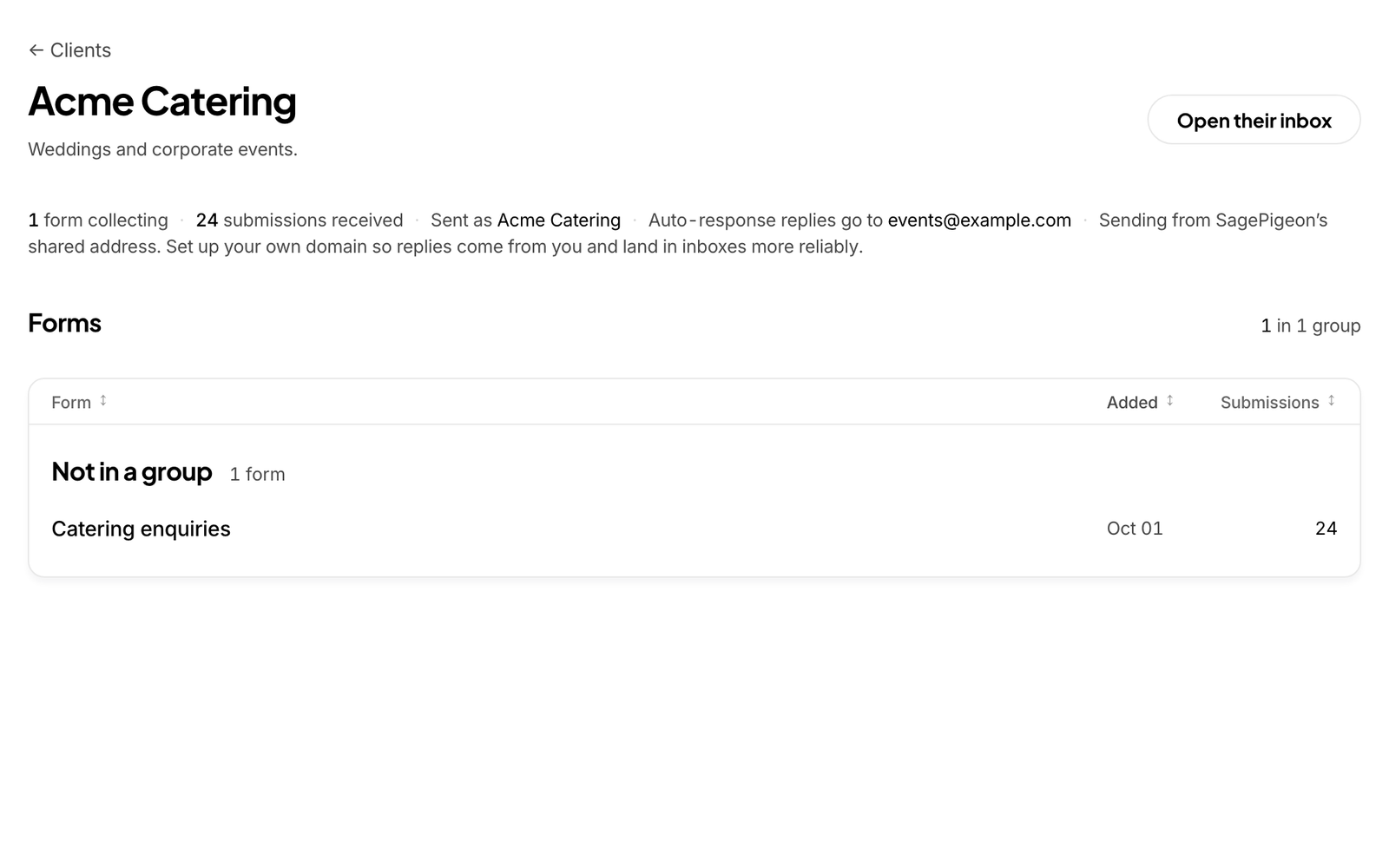
Point the form you already have at SagePigeon, or link to a hosted one on any plan. Group forms by client and site, and see at a glance which has somebody waiting.

Connect a form
The Forms page of an agency workspace: forms grouped under each client and site, each with how long its oldest request has waited, who it notifies and its endpoint.

Also in the box

  • An instant reply

    An auto-response goes out as the form arrives, so nobody wonders whether it went anywhere.

    Pro and Scale

  • A price before they send

    Optional estimates turn quantities and options into an indicative range on the form.

    Pro and Scale

  • Files with the request

    Briefs, screenshots and purchase orders upload from the form and arrive as private links.

    Pro and Scale

  • Searchable, and in Sheets

    Every answer is kept and searchable for 30 days on Free, a year on Pro and two years on Scale. Each one can land in Google Sheets as it arrives, and CSV export is on Pro and Scale.

  • Spam kept out

    Filtering and a hidden trap field, so no captcha is needed.

  • Where you already talk

    Slack on every plan. Teams, Discord, Google Chat, Mattermost, Telegram and signed webhooks on Pro and Scale.

  • Response times

    The slowest reply as well as the median, because one request left for two days can cost more than the average shows. On every plan, with a nudge for anything left unanswered.

  • Your own sending domain

    Notifications and receipts go out from your domain once it is verified.

    Pro and Scale

The email you send, from templates you can change without a deploy

Receipts, reminders, password resets: one request, quoting a template by name and filling its variables. Every send goes through the same suppression list and delivery log as your form mail.

Read the Email API docs

One send, from a template
POST /api/v1/emails
x-api-key: fsk_live_…
content-type: application/json

{
  "template": "Order receipt",
  "to": "customer@example.com",
  "variables": {
    "customer": { "name": "Jo" },
    "order": { "number": "8812", "total": "$140.00" }
  },
  "idempotencyKey": "order-8812"
}

→ 202 { "id": "…", "status": "sent",
        "to": ["customer@example.com"], "suppressed": [],
        "remainingToday": 1999 }

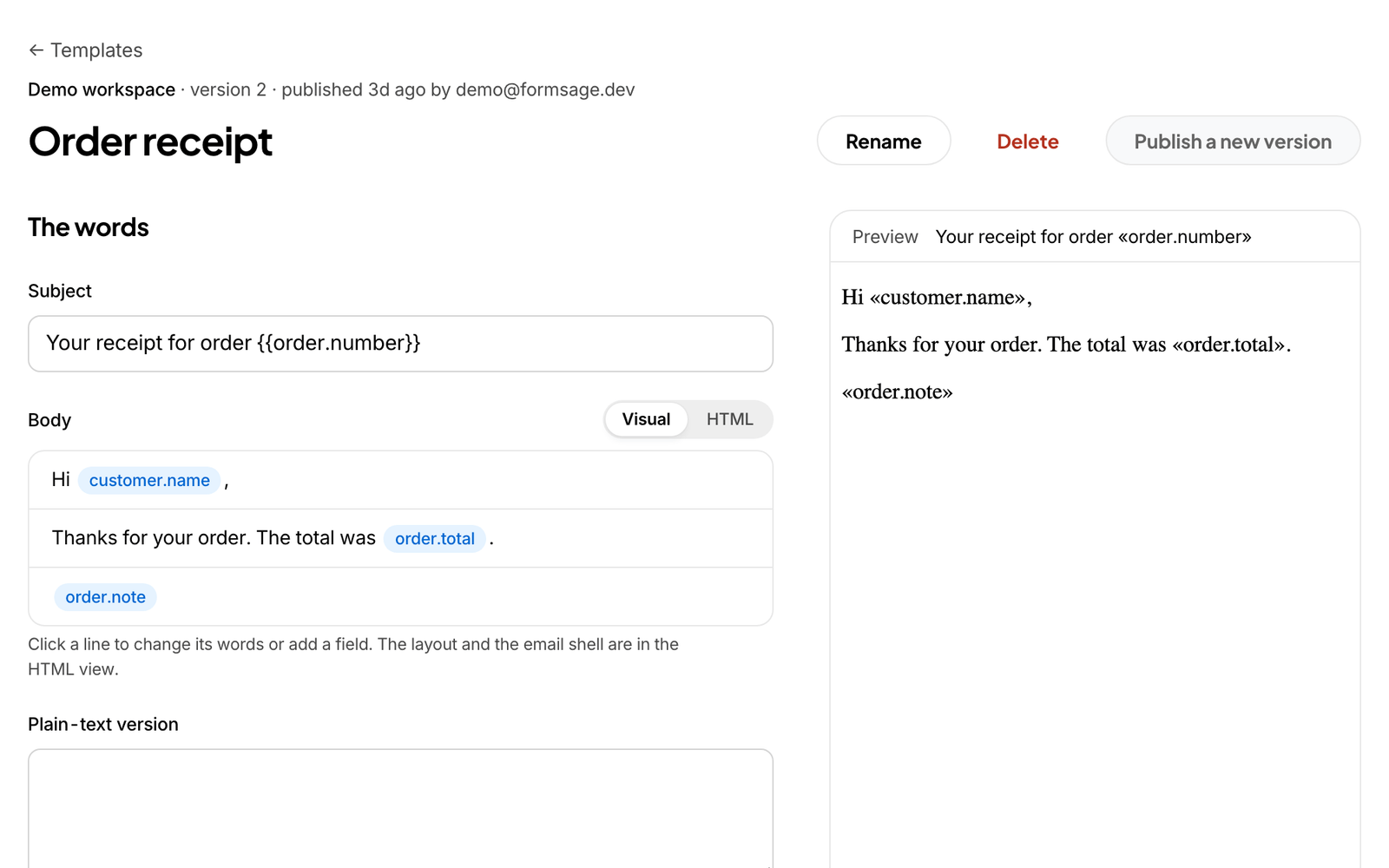
The words live in the dashboard

Whoever owns the wording edits the template. Every publish is a version, and an older one can be restored.

Pin a version, or take the newest

Add templateVersion to a send and it keeps sending those exact words whatever is published later.

A delivery record for every send

Each message lands in the same log as your form mail: sent, delivered, bounced, reported as spam.

Suppression handled for you

An address that bounced or complained is not sent to again, and the response names who was dropped.

Safe to retry

Send the same idempotencyKey twice and the second call returns the first message, so the customer gets one email.

Built for transactional mail

On Pro and Scale: 10 recipients a request, 2,000 emails a day on Pro and 20,000 on Scale, sent from a domain you have verified.

Priced by submissions

Every workspace starts free. Choose Pro or Scale and you go to payment straight after sign-up.

Free

$0a month

No card needed

For a few forms on one site.

Start free
  • 500 submissions / month
  • 3 forms, 1 person
  • Submission list you can search
  • 30 days of history
  • Notification emails you can word yourself
  • Slack notifications and Google Sheets rows
  • Response times and unanswered-request nudges
  • Hosted form pages, with a SagePigeon badge
  • Spam filtering, no captcha needed

Recommended

Pro

$49a month

or $490 a year

For teams that need every inbound request handled.

Start with Pro
  • 5,000 submissions / month, then 1¢ each
  • 50 forms, 10 people
  • Optional estimates on the form
  • Routing rules: the right person gets it
  • Instant auto-reply carrying their estimate
  • Replies threaded back onto the submission
  • Emails sent from your own domain
  • Email API and API keys, 2,000 emails a day
  • Hosted forms without our badge, and file uploads
  • A year of submission history
  • Teams, Telegram, Discord, webhooks, CSV export

Scale

$149a month

or $1,490 a year

For organizations and agencies running many forms or clients.

Start with Scale
  • 50,000 submissions / month, then 1¢ each
  • 500 forms, 100 people
  • Everything in Pro
  • Email API, 20,000 emails a day
  • File uploads up to 25 MB
  • Two years of submission history

Compare plans

Questions people ask

Do I need a developer to set this up?

Not for forms. Change your form’s action to the address SagePigeon gives you and add one hidden field; the snippet on the form’s Setup tab has both. Or link to a hosted form instead, on any plan; on Free it carries a small SagePigeon badge. The Email API is for your developer, and its templates are edited in the dashboard by whoever owns the words.

Does it work with the website I already have?

If you can add your own HTML to a page, yes. That covers custom sites, static site generators, WordPress, and the HTML or code blocks that most site builders offer. A builder’s own form block may not be able to send to another address, so use an HTML block with the SagePigeon snippet, or link to a hosted form, which every plan has. Your form keeps its look.

Can I use the email API without any forms?

Yes, on Pro and Scale. Verify a sending domain, create an API key with Allow writes under Sending, then API keys, and post to /api/v1/emails. Templates, the delivery log and the suppression list work the same either way.

Who can see the submissions?

People you invite to the workspace, and the places you send them, such as a Slack channel or a sheet. A client login sees only its own client’s requests. SagePigeon’s operator console shows counts and settings, never what anyone submitted. Submissions are kept for 30 days on Free, a year on Pro and two years on Scale, and you can set a form to remove what people typed as soon as the notification is delivered.

What happens when I go past 500 submissions on Free?

Submission 501 and every one after it is held: the person sending it sees their message go through, and its answers stay locked until you move to a paid plan, when they all land in your inbox at once, with no burst of notifications. Nothing is lost. Only past 5,000 in a month is a submission refused. On Pro and Scale, submissions past the allowance are accepted at 1¢ each unless the owner switches that off in Billing, in which case they are held the same way.

Does spam count toward my submissions?

No. Submissions caught by the hidden trap field or a captcha go to the Spam list for 7 days without being counted. If one was a real person, release it and it is delivered like any other.

Start with the form you already have.

Point it at SagePigeon, then send a test submission from the dashboard and see it arrive.

Free for 500 submissions a month. No card.